Network Games
Worksheet (to download and print out)
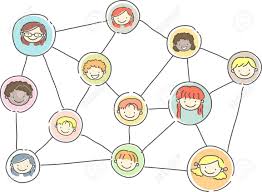
Here we will look at games that are based around the idea of a network. A network is a collection of things (called dots, nodes or vertices) that are joined together in pairs by connections (called lines, edges or links). Networks are used in many areas of computing and science. One application, for example, called the small world model, is used to model the spread of viruses such as the COVID-19 virus.
In our first look at networks, we won't be doing anything too fancy, just getting used to the idea and seeing what counting games we can create using them.
Step 0: Setup and Game Assets
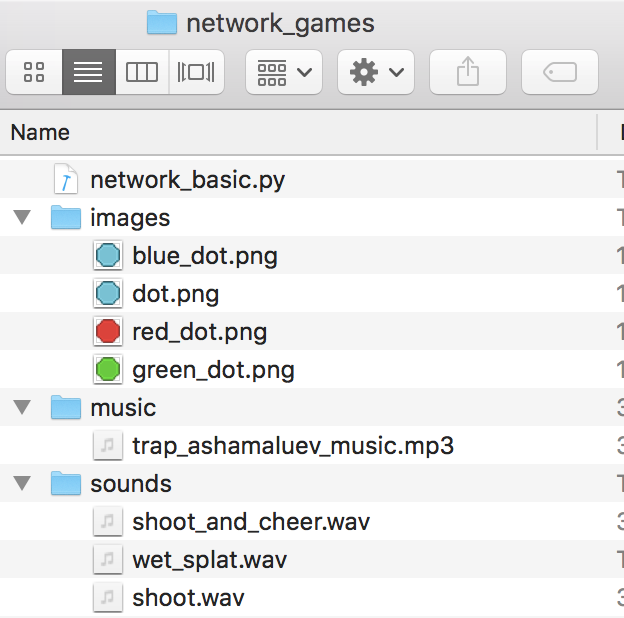
- Change directory to your standard folder for python projects. It is probably
coderdojo_tramore. - Make a new sub-directory called
network_games. - Inside sub-directory
network_games, make a new sub-directory calledimages. - Download (right click on) each of the following images and place them into the
imagesdirectory. - Inside sub-directory
network_games, make a new sub-directory calledsounds. - Download (right click on) each of the following images and place them into the
soundsdirectory. - Inside sub-directory
network_games, make a new sub-directory calledmusic. - Download (right click on) each of the following images and place them into the
musicdirectory.


Step 1: Program network_basic.py
The Worksheet coveres the steps needed to
implement the basic game, which we saved as network_basic.py during our first online session.
By the end of the session we completed the game and had the following code.
This will be our starting point for this week's session.
So either download the python file
network_basic.py
or copy/paste the code below into you editor.
from random import randint

WIDTH = 800
HEIGHT = 600

dots = []
lines = []

next_dot = 0

for dot in range(0, 10):
    actor = Actor("dot")
    actor.pos = randint(20, WIDTH - 20), randint(20, HEIGHT - 20)
    dots.append(actor)


def draw():
    screen.fill("black")
    number = 1
    for dot in dots:
        screen.draw.text(str(number), (dot.pos[0], dot.pos[1] + 12))
        number = number + 1
        dot.draw()

    for line in lines:
        screen.draw.line(line[0], line[1], (200, 200, 0))


def on_mouse_down(pos):
    global next_dot
    global lines

    if dots[next_dot].collidepoint(pos):
        if next_dot:
            lines.append((dots[next_dot - 1].pos, dots[next_dot].pos))
        next_dot = next_dot + 1
    else:
        lines = []
        next_dot = 0
Step 2: Refactor code
The Worksheet covers some of the changes that we will make to the above code but during the session we will cover the reasons for these changes in more detail.
Outline of steps:
- Click on
 to create a new file.
 - Click on
 to save the file as
 network_refactored.pyin yournetwork_gamesfolder. - Copy the code from
network_basic.pyintonetwork_refactored.py. - Carry out the changes covered in the Worksheet and discussed during the session.
Our refactored code looked like.
from random import randint

WIDTH = 800
HEIGHT = 600

dots = []
lines = []

next_dot = 0

for k in range(0, 50):
    dot = Actor("dot")
    dot.pos = randint(20, WIDTH - 20), randint(20, HEIGHT - 20)
    dots.append(dot)


def draw():
    screen.fill("black")

    for k, dot in enumerate(dots):
        screen.draw.text(str(k+1), (dot.x, dot.y + 12))
        dot.draw()

    for line in lines:
        start, end = line
        screen.draw.line(start, end, (200, 200, 0))


def on_mouse_down(pos):
    global next_dot
    global lines

    if dots[next_dot].collidepoint(pos):
        if next_dot:
            lines.append((dots[next_dot - 1].pos, dots[next_dot].pos))
        next_dot = next_dot + 1
    else:
        lines = []
        next_dot = 0
Step 3: Adding sounds, music and titles
Next it would nice to add some sound effect and to create a heads up display (HUD) showing the current state of the game.
Outline of steps:
- Click on to create a new file.
- Click on to save the file as
network_sounds.pyin yournetwork_gamesfolder. - Copy the code from
network_refactored.pyintonetwork_sounds.py. - The sound effects are similar to what we used in Fruit Ninja games so have a look at that worksheet to see how we added both sound effects and background music. The only change here is that we have an extra sound effect, wet_splat.wav, that we use when the player misses.
- The HUD is also similar to what we used in Fruit Ninja games so have a look at that worksheet to help you. The only difference in this game is that we want to show how much time has passed since the game started or, better, show a clock counting down.
- Add lives, using a new global variable called
lives,
Hopefully by the end of the session we will have something like the following:
Step 4: Building games
We are going to build a few games based on the network game idea, such as:Game 1: 10 Words
This game is just our network game, but this time we are finding words in the network. We need to use a larger dot so start by downloading
following images and place it into the images directory.

Our starting point is the following code network_10_words.py
# imports of useful functions
from random import randint  # randint(a,b)       picks random integer between a and b
from random import choice  # choice(collection) picks a random element from a collection
import string

# game date

WIDTH, HEIGHT = 800, 600

words = ["dog", "cat", "banana"]
nodes = []
edges = []
previous_node = None
level = 0
next_letter = 0


def start():
    """Function to start game (or new level)."""

    global nodes, edges, previous_node
    global level, words, word, next_letter

    # STEP 0 - reset data
    pass

    # STEP 1 - pick a random word
    pass

    # STEP 2 - generate extra random dots based on the level
    pass

    # STEP 3 - generate random dots to store word
    pass


def update():
    """Function to update game variables."""

    pass


def draw():
    """Function to draw screen."""

    global nodes, edges, previous_node
    global word, level

    # STEP 1 - Clear the screen
    pass

    # STEP 2 - Draw title and HUD
    pass

    # STEP 3 - Draw nodes
    pass

    # STEP 4 - Draw edges
    pass


def on_mouse_down(pos):
    """Function to respond to mouse click events."""

    global nodes, edges, previous_node
    global level, word, next_letter

    # CHECK - hit a correct node?
    pass

    # CHECK - Win level?
    pass


start()
Game 1: 10 Words (part 2)
Our starting point is the following code network_10_words_part_2.py
# imports of useful functions
from random import randint  # randint(a,b)       picks random integer between a and b
from random import choice  # choice(collection) picks a random element from a collection
import string

# game date

WIDTH, HEIGHT = 800, 600

words = ["dog", "cat", "banana"]
nodes = []  # was called dots
edges = []  # was called lines
previous_node = None
level = 0
next_letter = 0


def start():
    """Function to start game (or new level)."""

    global nodes, edges, previous_node
    global level, words, word, next_letter

    # STEP 0 - reset data
    pass

    # STEP 1 - pick a random word
    word = choice(words)
    print("Current word is", word)

    # STEP 2 - generate extra random dots based on the level
    pass

    # STEP 3 - generate random dots to store word
    for letter in word:
        node = Actor("big_blue_dot")
        node.pos = randint(20, WIDTH-20), randint(60, HEIGHT-20)
        node.label = letter
        node.used = False
        nodes.append(node)


def update():
    """Function to update game variables."""

    pass


def draw():
    """Function to draw screen."""

    global nodes, edges, previous_node
    global word, level

    # STEP 1 - Clear the screen
    screen.fill("black")

    # STEP 2 - Draw title and HUD
    screen.draw.text("10 Words", midtop=(WIDTH//2,0), color="orange", fontsize=60)
    screen.draw.text(f"Level {level}", bottomright=(WIDTH-10,40), color="green", fontsize=40)
    screen.draw.text(word, bottomleft=(10,40), color="pink", fontsize=40)

    # STEP 3 - Draw nodes
    for node in nodes:
        node.draw()
        screen.draw.text(node.label, center=node.pos, color="black", fontsize=40)

    # STEP 4 - Draw edges
    for edge in edges:
        start, end = edge
        screen.draw.line(start, end, (255,255,0))


def on_mouse_down(pos):
    """Function to respond to mouse click events."""

    global nodes, edges, previous_node
    global level, word, next_letter

    # CHECK - hit a correct node?
    for node in nodes:                  # checking each node
        # SUCCESS = node has correct letter AND node not used before AND mouse clicked on it
        if node.label==word[next_letter] and node.used==False and node.collidepoint(pos):
            print("HIT")
            sounds.shoot.play()
            if previous_node is not None:
                edges.append( (previous_node.pos, node.pos) )
            next_letter += 1
            previous_node = node

            break
    else:
        print("MISS")
        sounds.wet_splat.play()


    # CHECK - Win level ?
    pass


start()